Persian dictation for Mac
Speak Persian.
Keep your English.
Hold a key, talk, and your words appear in any app. Persian stays Persian, English terms stay in Latin letters, all in the same sentence.
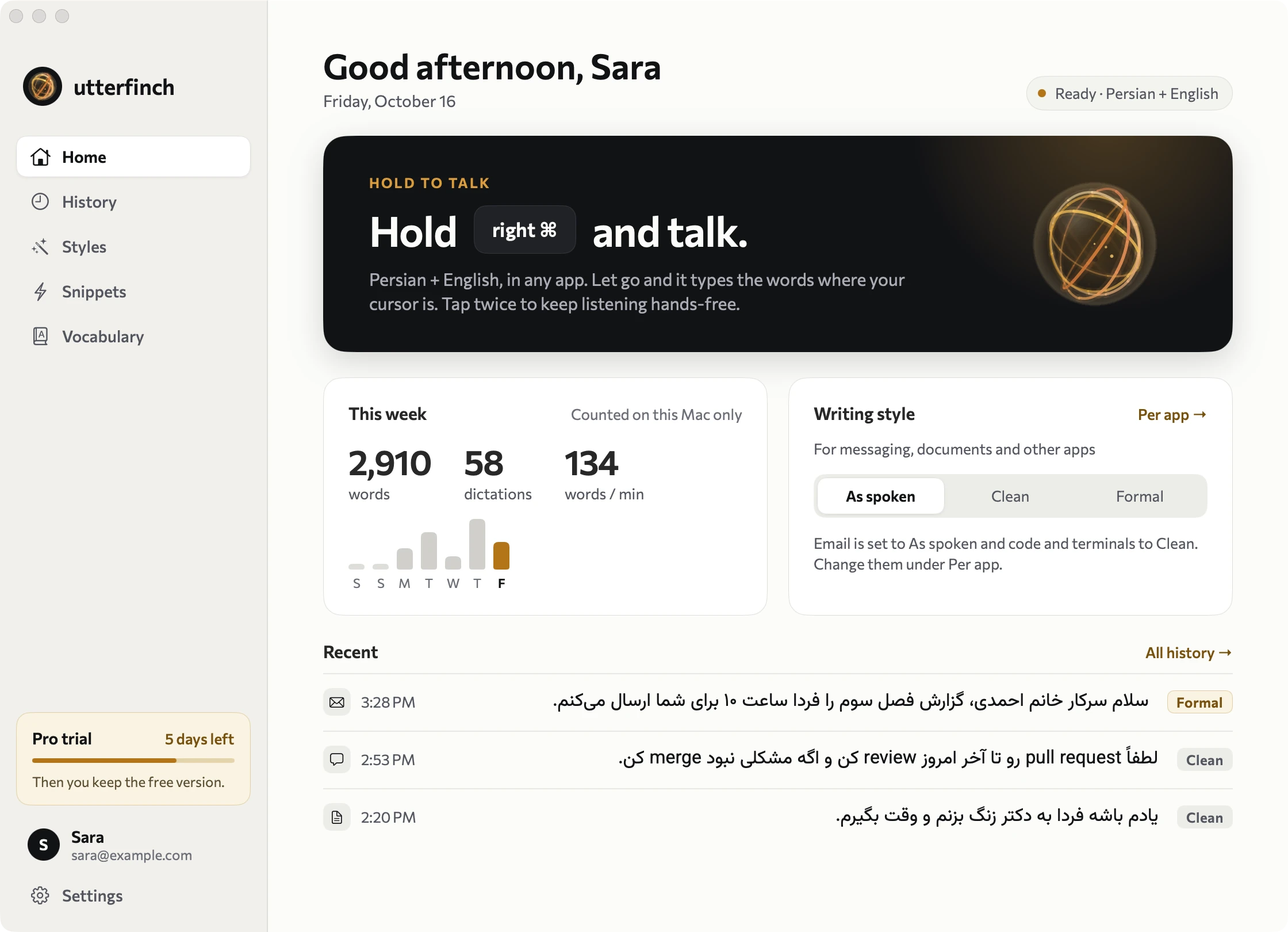
Sample data. The window is Utterfinch on a Mac.
The sentence that breaks dictation
You don’t think in one language. Your dictation shouldn’t write in one.
Bilingual people say «این feature رو deploy کن». Most dictation drops the English or spells it in Persian letters. Utterfinch writes both the way you meant them.
این فیچر رو دیپلوی کن
این feature رو deploy کن
Illustrative example.
How it works
Hold. Talk. Release.
Hold a key
The fn key by default, or right ⌥ or right ⌘. Utterfinch helps you set it up.
Talk
Your words appear live in a small floating pill. Speak as long as you like; it grows into a card.
Release
The text is typed into whatever app has your cursor. Mail, Slack, Notes, your editor: anywhere you can type.
Tap the key twice to keep listening hands-free. Press Esc to cancel.
Writing styles Pro
Speak casually. Write the way you mean to.
Persian is spoken one way and written another. Pick a style once, or per kind of app, and stop rewriting your own words.
- As spoken. Exactly what you said, with punctuation added on your Mac. Great for chats and notes.
- Clean. Fillers and repeats gone, punctuation fixed, English names in Latin letters.
- Formal. Spoken Persian becomes written Persian, for email and documents.
- Per app. Formal in Mail, Clean in Slack, As spoken in Notes. Terminals are never edited.
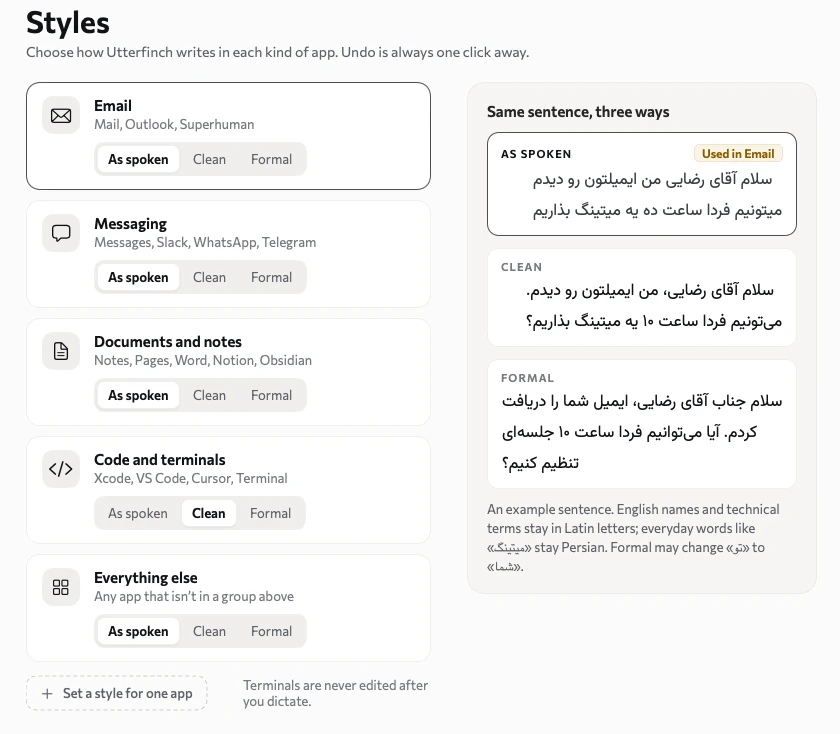
Same sentence, three ways. Clean and Formal are part of Pro.
Details
Persian typography, done properly.
The small things that make text look like a person wrote it.
Half-spaces where they belong
The Persian half-space (ZWNJ) is kept, as you would type it.
Persian punctuation
Persian marks, not their English cousins.
English in Latin letters
API, pull request, GitHub: written as people write them.
Numbers, your way
Digits or words, Persian or Latin. Both are fine.
Right-to-left that stays right
Mixed lines don’t scramble around the English.
Your words
Add names and terms once and they are written the way you want.
Your words and shortcuts
It learns the words only you use.
Names of teammates, your product, your stack. Add them once and Utterfinch writes them your way. Say a short phrase and get a whole address, signature or template.
- Vocabulary. Names and English terms, written the way you want to see them. Matched on your Mac.
- Snippets. Say “my work email” or «آدرس کار» and the full text goes in, right where you said it.
- History on your Mac. Search what you dictated. Keep it for as long as you like, or turn it off.
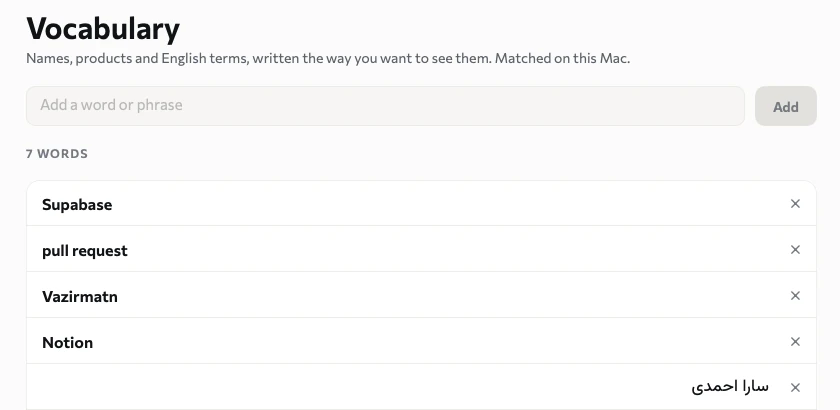
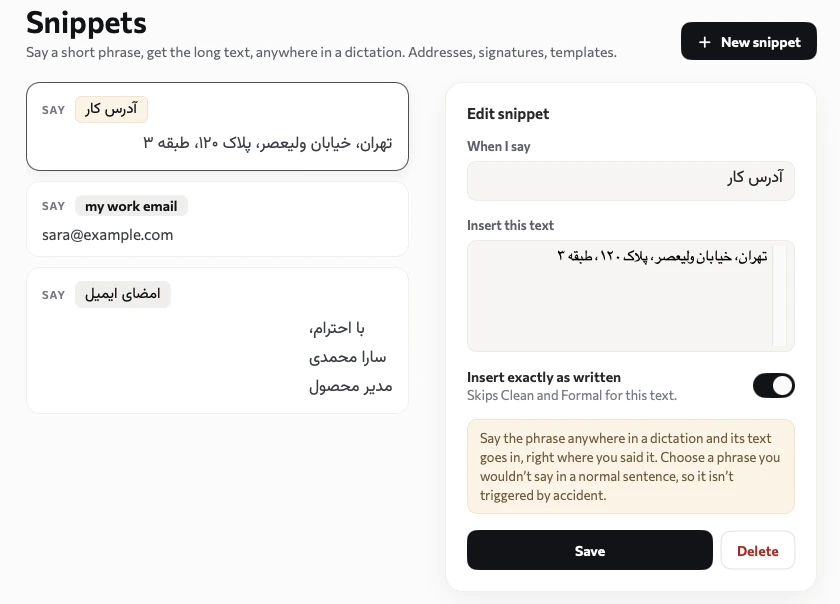
Vocabulary and Snippets. Sample data.
The Orb
Meet the Orb.
A small sphere of light with five rings, each on its own axis, drifting and turning as you speak. Almost still when you pause, lively when you talk. It is how Utterfinch listens, and the only thing you need to look at.
Nothing is recorded on this page. The voice here is simulated.
Privacy
Clear about where your voice goes.
Two ways to use Utterfinch, and we say plainly what each one does.
Free: stays on your Mac
- Your voice is recognised on your Mac. Audio never leaves it.
- Works offline, in airplane mode, on bad café Wi-Fi.
- No account needed to dictate.
- Vocabulary, snippets and history live on your Mac.
Pro: a faster, smarter server
- Your audio is streamed to our server for our most accurate model, and is not stored.
- Clean and Formal send the text (never the audio) to a hosted language model to rewrite it.
- If the connection drops, your Mac’s own model takes over.
- Needs an account. You can download your data or delete the account any time.
Your history is yours
Kept on your Mac only, for as long as you choose. Turn it off and nothing is saved.
Sharing is opt-in
You can choose to share an audio clip and what you really said, to help improve Persian speech. It is off by default, anonymous, and you can delete it with a code.
No ads, no tracking
This website and the app don’t use analytics or advertising trackers.
Pricing
Free to start. Pro when you want more.
The free app costs us almost nothing to run, so it stays free. Pro uses our servers.
Free
Persian dictation, on your Mac.
- Persian dictation that runs on your Mac
- Works offline
- Persian punctuation
- Vocabulary, snippets and history
- No account needed
Pro
For people who dictate every day.
- Persian and English in the same sentence
- Our most accurate speech model
- Clean and Formal styles, set per app
- Your Mac’s model as a backup if you go offline
- Fair use: about 30,000 words a day
Prices will be in USD. Payments from some regions are limited right now. Cancel any time.
FAQ
Questions, answered.
Does it work offline?
Free does: the speech model is inside the app. Pro streams your voice to our server for the most accurate results, and your Mac’s own model takes over if the connection drops (without Clean and Formal).
Is my voice sent anywhere?
Free: no. Everything stays on your Mac. Pro: your audio goes to our server to be recognised and is not stored. Clean and Formal also send the text to a hosted language model. The Privacy section above has the details.
Do you store my text?
No. Text is typed into your app and not kept by us. Your History is saved on your Mac only, and you can turn it off.
Which languages does it support?
Persian with English mixed in. Dari, Tajik and more accents are on the list; the model is trained mostly on standard Persian today.
What Macs does it need?
macOS 14 or later, on Apple silicon. The speech model is a download of about 2 GB.
Why is the download big?
The whole speech model lives on your Mac. That is what makes the free version private and offline.
Which apps does it work in?
Any app where you can type. It needs the Microphone permission to listen and the Accessibility permission to type for you.
What if my Mac uses fn for emoji?
Utterfinch notices and walks you through the one setting to change, or you can use right ⌥ or right ⌘ instead.
Can I help improve it?
Optionally. You can share a single recording and what you really said. It is off by default, anonymous, and you can ask for it to be deleted.
Windows? iPhone? Teams?
Mac first. Windows is next on the list. Teams features are not planned yet: tell us if your team needs them.
Get early access
We’re opening Utterfinch to Persian-speaking engineers, writers and teams first. Leave your email and we’ll write when it’s your turn.